All Document Center
- 3.9
- Rating
- 1.00M
- Installs
- Free
- Price
 Analysis by App-foxy
All Document Center is the kind of productivity app I would try when my phone has become a messy drawer of PDFs, scans, forms, and other files. Its purpose is straightforward: bring document management and basic processing into one place instead of making me jump between a file browser, a scanner, and separate editing tools. That focus makes it easy to understand, but it also means the app is best judged as a practical organizer rather than a complete office suite.
In my experience, the appeal is less about doing sophisticated work and more about reducing small daily annoyances. If I need to locate a document quickly, inspect it, make a basic adjustment, or keep related files together, a dedicated document center can feel more convenient than relying on whichever file manager happens to be installed on the phone. The app is free, aimed at Everyone, and developed by 5660 BA, LLC, so it is accessible to a broad range of Android users.
The current release is version 1.2.1, and the app arrived on July 17, 2025. Those details matter because this is still a relatively young product, not a decades-old office platform with every professional feature already established. I see it as an evolving utility with a clear everyday purpose. Its store presence has already reached over one million installs, while its average sits at 4.1 from around one thousand ratings, which suggests that many people find the basic idea useful even though it may not satisfy every document-heavy workflow.
You May Also Like

 Blood Strike: 2.5 Anniversary
Blood Strike’s Loadouts Turn Every Drop Into a Tactical Gamble
A close look at Blood Strike’s custom loadouts: how fast access to signature weapons reshapes its battle royale rhythm, rewards preparation, and narrows the gap between fights.

 Pandora - Music & Podcasts
Pandora’s Music Is Easy to Start, but Harder to Recover
Pandora’s strength is its low-effort path from a seed to a station. Its weak spot is how much confidence it asks you to place in connection, setup, and quiet recovery.

 8 Ball Pool
 Is Built on Rivalries, Rematches, and Routine
A close look at the rivalries, rematches, shared routines, and unanswered safety questions that turn a quick pool match into a persistent mobile community.

 Samsung Music
’s Quiet Strength Is Playing What You Already Own
Its reach comes less from spectacle than from dependable access to a personal library. That simplicity is both the app’s strongest retention engine and its ceiling.

 AccuWeather: Weather Radar
AccuWeather Review: A Quick, Clear Forecast for Everyday Decisions
For everyday plans, the best forecast is the one you can understand quickly. AccuWeather makes rain timing, radar, and local conditions easy to act on, with a few trade-offs.

 Hill Climb Racing
Why Hill Climb Racing Still Turns Crashes Into One More Run
A tiny car, a bumpy hill and one more upgrade: Hill Climb Racing keeps resurfacing because its simple chaos makes every near-miss feel personal.
More From Our News Desk
View All News


How All Document Center fits into everyday document work
I find a document app most useful when it saves me from retracing where a file came from. This section looks at how All Document Center can serve as a focused place to gather and handle everyday paperwork, rather than asking a general file browser to do everything. I’ll also consider the small habits that make that convenience last, leading into a closer look at its simple home for scattered files.
A simple home for scattered files
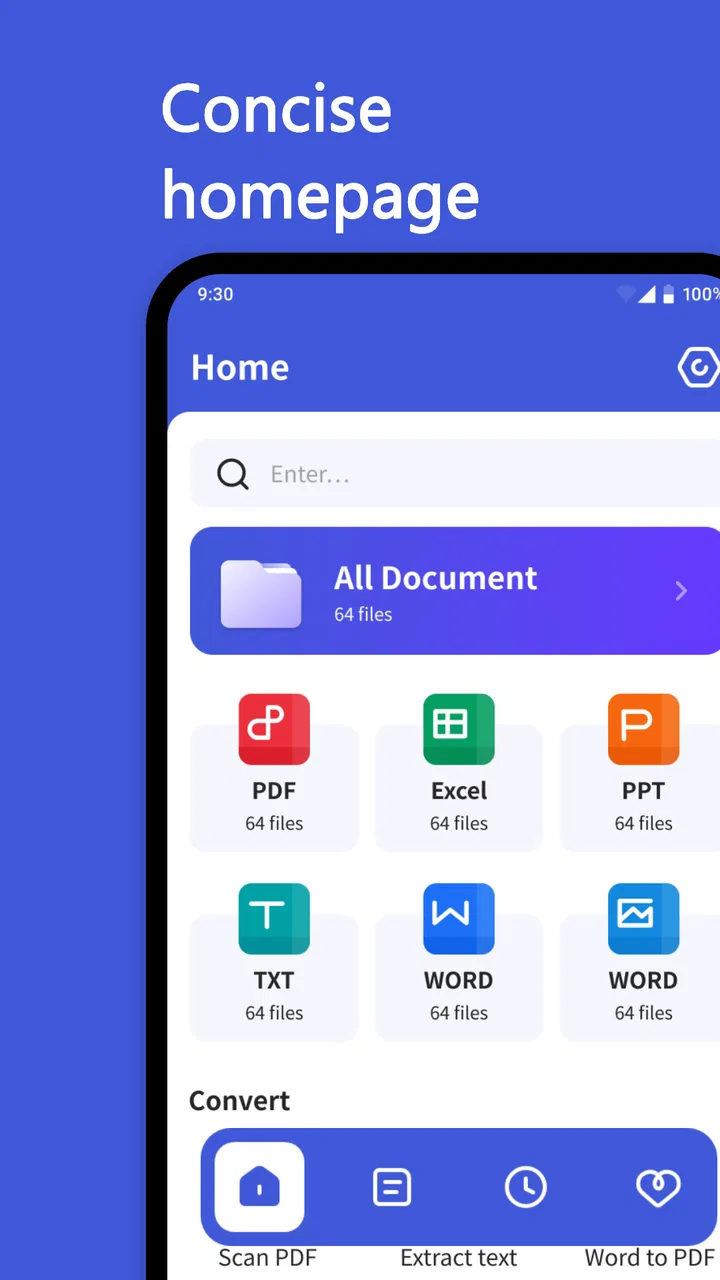
The strongest reason to use All Document Center is convenience. Phones often accumulate documents from messaging apps, email attachments, downloads, cloud services, and camera scans. Without a consistent place to review them, important files become difficult to find. The app’s document-management focus gives me a more intentional starting point: open the tool when I want to deal with documents, rather than searching through unrelated folders and recent files.
This is especially useful for people who handle a mixture of personal paperwork and routine work files. A student might keep assignment PDFs and reference documents nearby. Someone managing a household could use it as a working area for bills, forms, receipts, or travel paperwork. A small-business owner may appreciate having invoices and application documents available on a phone without needing a laptop for every minor task.
I would not treat it as a replacement for a carefully designed filing system. The app can make access easier, but the quality of the result still depends on how consistently I name, sort, and review documents. A useful habit is to process new files immediately: open them, decide whether they are worth keeping, and place them where they will be easy to recognize later. That workflow prevents the app from becoming another crowded inbox.
Basic processing is the practical sweet spot
The wording around basic processing sets a sensible expectation. I would use this app for straightforward document actions rather than advanced publishing or complex collaboration. That distinction is important. A document tool can be valuable even when it does not offer every feature found in a desktop office package, provided it handles the small jobs quickly and clearly.
For example, I can imagine using it before sending a form to someone else: locate the file, check that it is the correct version, make a simple adjustment if available, and then share or continue working from the phone. The benefit is not necessarily a dramatic transformation of the document. It is the reduction of steps between finding a file and completing a small task.
That also makes the app approachable for users who do not want a full office suite. Large productivity platforms can be powerful, but they often bring crowded menus, account requirements, and features that are irrelevant to a person who only needs to inspect and manage documents. All Document Center appears aimed at a lighter, more direct experience.
Where it helps more than a normal file manager
A standard file manager is excellent for browsing folders, but it does not always feel like a document workspace. It may show images, downloads, audio, archives, and application files together, leaving me to decide what matters. A document-focused app can narrow that attention and make routine paperwork feel less scattered.
The difference becomes noticeable in a realistic situation. Suppose I am leaving for an appointment and need to find an identification form, a supporting PDF, and a receipt saved earlier in the week. With a general file browser, I may remember only fragments of their names or where they came from. A document center gives me a purpose-built place to start, review the files together, and prepare the right items before I leave. That is a small improvement, but it is exactly the kind of improvement that makes a utility worth keeping.
There is also a useful separation between storage and action. I do not have to open a document in a heavyweight editor merely to read it or perform a minor task. For quick checks, that lighter approach can save time and battery attention, especially when I am working from a phone screen.
What the latest release tells me about the product
Version 1.2.1 indicates that the app has already moved beyond its initial launch build, which is encouraging for a product released in 2025. I see that as evidence of ongoing refinement rather than proof of a particular new feature. Since I should not assume that every update changes the visible interface, I would judge the release by how reliably the current workflow behaves: opening documents, keeping navigation understandable, and making basic processing feel predictable.
For existing users, a version update is most valuable when it removes friction rather than simply adding more buttons. A document utility benefits from improvements that make file selection clearer, reduce accidental actions, and keep the path from opening a document to finishing a task short. Those are the areas I would pay attention to when using the current build.
The release timing also frames expectations. I would give this app room to develop, but I would not choose it solely on the promise of future additions. My decision would be based on whether the current version already covers my everyday needs. That is a useful rule for any young productivity app: treat future growth as a bonus, not as part of the feature set I am buying today.
How current users may experience the update
Someone who installed an earlier build will probably care less about the version number than about continuity. Document apps become trusted tools when I can return to them without relearning the entire workflow. A stable structure matters because I often open these utilities while distracted, in a hurry, or handling paperwork that I do not want to examine twice.
The best way to evaluate the current release is to repeat a few ordinary tasks after updating. I would open a familiar document, locate another file from a different source, perform a basic action, and then return to the document list. This simple test reveals whether navigation remains intuitive and whether the app still fits existing habits. It also helps identify whether an update has changed the way files are displayed or selected.
New users can take a different approach. Rather than importing everything immediately, I would start with a small group of documents that I use often. That makes it easier to understand the app’s organization and prevents an initial flood of files from hiding the useful ones. Once the routine feels comfortable, I could expand the collection gradually.
Three workflows that make the app more useful
My first practical tip is to create a “working set” of documents instead of treating the app as a permanent archive. Keep only the files that need attention soon—forms to complete, receipts to verify, or papers to send. After the task is finished, move the document to its long-term location or remove the duplicate. This keeps the app focused and avoids confusing an active workspace with backup storage.
Second, I would use a consistent naming pattern before collecting many files. Names that begin with a clear subject, followed by a person or purpose, are easier to scan than automatic camera or download names. Even a modest convention such as “insurance renewal” or “school form” can save more time than repeatedly opening files to identify them. The app can improve access, but disciplined naming improves recognition.
Third, I would review a document on the phone before sharing it elsewhere. Mobile screens make it easy to overlook a blank page, an unwanted duplicate, or an outdated attachment. A quick check inside the document workflow can prevent sending the wrong version. This is a less obvious benefit of having management and basic processing close together: I can inspect the file at the moment I am preparing it, rather than trusting memory.
Who should choose it, and who should look elsewhere
I think All Document Center is a good match for people who want a focused document utility without paying for a full productivity ecosystem. It may suit students, families, casual freelancers, and anyone who regularly downloads forms or receives PDFs but does not need advanced layout work. The Everyone age rating and free price also make it easy to try without committing money first.
I would be more cautious if my work depends on complex spreadsheets, detailed word-processing controls, electronic-signature workflows, real-time collaboration, or strict business document processes. In those cases, a mature office suite or a specialized document service is likely the better choice. The same applies if I need a proven archival system with sophisticated search, version history, or team permissions. A basic document center should not be mistaken for an enterprise records platform.
There is a similar trade-off with cloud-based alternatives. A cloud drive may be better when I need seamless access across several devices or want files synchronized with a team. All Document Center is more appealing when my priority is a direct mobile document workspace and I do not want every small action wrapped inside a larger collaboration system. The right choice depends on whether I value focused handling or broad ecosystem integration.
Remaining gaps and everyday friction
The app’s narrow focus is also its main limitation. “Basic processing” is useful, but the phrase does not promise the depth of a dedicated editor. I would not install it expecting desktop-level control over formatting, document design, or complicated conversions. When a task grows beyond simple handling, I may still need another app, which creates an extra handoff.
That handoff can be mildly inconvenient. Moving between applications may mean repeating file selection, checking whether a new copy was created, and deciding which version is now the correct one. My advice is to keep one clearly named master document and use temporary copies for experiments. This is particularly important when a document passes through several tools, because duplicate files can become harder to distinguish than the original problem.
Another potential weakness is that a focused app does not automatically solve organization. If I import every download, screenshot, and duplicate, the document list can still become noisy. I would therefore use it with a weekly cleanup habit: remove obsolete working copies, identify files that need long-term storage, and keep the active area limited to current tasks. The app is a useful center, but it still needs a human filing decision.
I also would not rely on a single mobile app as the only home for important records. For documents that matter legally, financially, or professionally, I prefer keeping an additional trusted copy in the storage system I already use. That is not a criticism unique to this product; it is sensible document hygiene. A convenient mobile workspace should support my records, not become the only place they exist.
What I would watch as the app evolves
Because the current version is still early in the product’s life, I would watch whether future releases deepen the core workflow without making it complicated. Useful progress would mean clearer organization, dependable handling of common document types, and smoother movement from discovery to basic processing. I would value those improvements more than a long list of unrelated extras.
I would also watch how well the app serves two very different audiences: people who want instant simplicity and people who need a dependable document routine. The first group may prefer minimal controls, while the second may eventually ask for stronger sorting, search, and file-history tools. Good evolution would balance both without turning a lightweight utility into an overcrowded office suite.
For someone deciding whether to install it now, my recommendation is practical: try it with a small, real document task rather than judging it from the feature concept alone. Bring in a few files, see how quickly you can identify them, and test whether the basic action you need feels natural. If that routine works, the app can become a handy part of your phone’s productivity setup. If your needs immediately involve collaboration, advanced editing, or formal document control, choose a more specialized alternative instead.
Overall, I see All Document Center as a promising free utility for bringing everyday paperwork into a more focused mobile workflow. Its 4.1 average and growing install base suggest genuine interest, while the current version’s early-stage position calls for realistic expectations. I would recommend it to a friend who wants a simpler way to manage and lightly process documents on Android, especially when a full office suite feels excessive. I would skip it for demanding professional document production, but for quick access, routine checks, and a cleaner working area, it is a sensible app to try.
FAQs for All Document Center
01What is All Document Center and what can I use it for?
All Document Center is a comprehensive app designed to manage, edit, and organize various document types, including PDFs, Word files, and spreadsheets. It's ideal for professionals and students who need to handle multiple documents on the go, offering features for editing, converting, and sharing files seamlessly.
02Is All Document Center available for both Android and iOS devices?
Yes, All Document Center is available for download on both Android and iOS platforms. Users can install the app from the Google Play Store or Apple App Store, ensuring compatibility with a wide range of smartphones and tablets for easy access and document management.
03Does All Document Center require an internet connection to function?
While some features of All Document Center, like cloud backup and online collaboration, require an internet connection, the app also supports offline document editing and management. This means users can access and edit their documents without needing to be connected to the internet at all times.
04What types of documents can I manage with All Document Center?
All Document Center supports a variety of document formats, including PDF, DOCX, XLSX, PPTX, and more. This versatility allows users to open, edit, and convert different types of files within the app, making it an all-in-one solution for document management.
05Are there any subscription fees or in-app purchases in All Document Center?
All Document Center offers a free version with basic features, but users can opt for a premium subscription to unlock advanced functionalities such as enhanced editing tools, additional cloud storage, and priority customer support. In-app purchases might also be available for specific features.
Pros
- User-friendly interface for easy navigation.
- Supports multiple document formats.
- Cloud integration for seamless access.
- Robust document editing tools.
- Secure document storage and sharing.
Cons
- Limited free version features.
- Occasional sync issues with cloud.
- Ads can be intrusive for free users.
- Requires internet for some features.
- Lacks advanced collaboration tools.

All Document Center
Gallery